
Pro: Maintain your published library
Improve the articles you already published—safely.
Strive Calendar Pro adds protected revisions, evidence-linked review, approved fixes, briefs, internal-link opportunities and a maintenance queue for the library you have spent years building.
From $9/month. Cancel anytime.
Pro capabilities
Six capabilities for a serious article library
Everything in Lite, plus the maintenance layer that keeps published work accurate.
Safe article revisions
Work privately on a published article while the live version stays untouched, then republish safely without changing its URL or history.
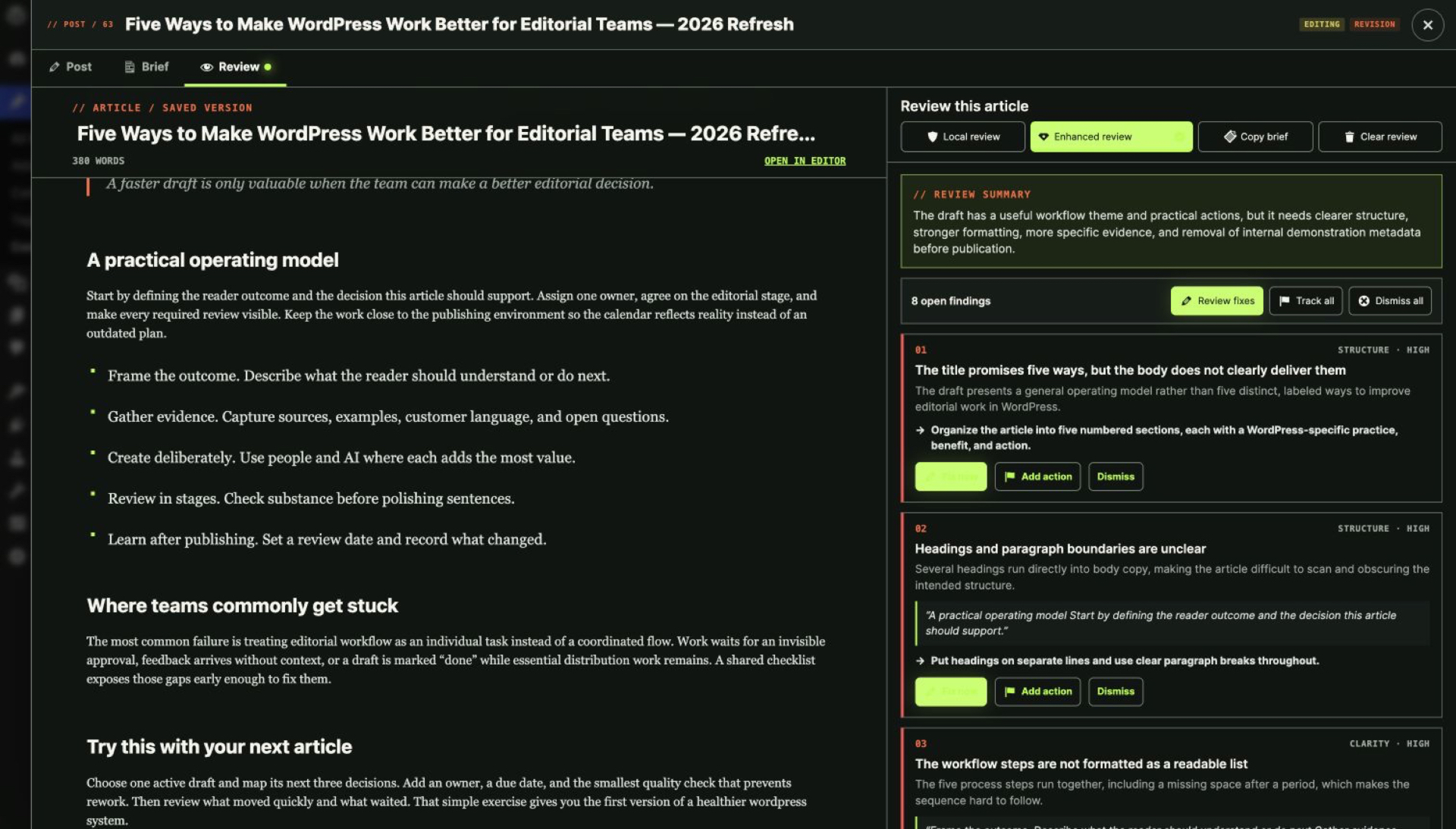
Enhanced Editorial Readiness
Ask the site's connected WordPress AI provider for deeper, evidence-linked editorial feedback beside the saved article.
Guided fixes with automatic re-evaluation
Review a before-and-after proposal, approve only the change you want, preserve a WordPress revision, and keep fixing without rerunning the full review.
Editorial briefs
Define audience, outcome, angle, keyword, evidence and acceptance criteria before writing, then use the brief to guide checklists and review.
Internal-link opportunities
Find relevant articles already on the site, review suggested anchors and insertion points, and apply a link only after approval.
Refresh Radar
See which published articles are due for attention, start a protected refresh revision and build content maintenance into the calendar.
Safety model
Nothing lands without your approval
Human approval is required
Every AI-assisted change is a proposal you inspect before it is written.
Stale content cannot be overwritten
If the article changed after a proposal was prepared, Strive refuses to apply it.
A native recovery point
An approved write is preceded by a WordPress revision.
Failures change nothing
A failed AI request leaves content, status, schedule and publication state untouched.
AI policy: WordPress native
AI is optional, and it never acts alone
Strive uses the AI provider connected to WordPress. There is no Strive-hosted AI service and no credit meter.
- Strive remains useful without AI.
- Strive never asks you to paste provider API keys into the plugin.
- AI features use the native WordPress AI connection and require WordPress 7.0 or later plus a compatible configured provider.
- Article content is sent only when an authorised user explicitly runs an eligible AI action.
- Private editorial notes are excluded from AI prompts.
- AI output is a proposal, not an automatic publication decision.
- A failed AI request leaves content, status, schedule and publication state unchanged.
Compare Lite and Pro
What Lite includes, and what Pro adds
Pro replaces Lite on activation and preserves your existing editorial data.
| Capability | Strive Calendar Lite — Free | Strive Calendar Pro — From $9/month |
|---|---|---|
| Content Calendar | Included | Included |
| Unscheduled drafts | Included | Included |
| Pipeline Board and List | Included | Included |
| Four editorial statuses | Included | Included |
| Reusable checklists and per-article progress | Included | Included |
| Editorial notes | Included | Included |
| Local Editorial Readiness | Included | Included |
| Copyable external review brief | Included | Included |
| Solo and Team Workspace | Included | Included |
| Automatic, Light and Dark appearance | Included | Included |
| Safe revisions of published articles | Pro only | Included |
| Enhanced WordPress AI readiness | Pro only | Included with eligible WordPress AI connection |
| Guided fixes and automatic re-evaluation | Pro only | Included |
| Editorial briefs and brief-to-checklist | Pro only | Included |
| Internal-link opportunities and safe application | Pro only | Included |
| Refresh Radar | Pro only | Included |
| License or expiry | None | Paid Pro license required for Pro execution |
"Pro only" means Lite shows you where the capability lives, but running it requires an active Pro license. See full pricing.
FAQ
Questions, answered
What does Pro add over Lite?
Safe revisions of published articles, enhanced editorial readiness, guided fixes with automatic re-evaluation, editorial briefs, internal-link opportunities and Refresh Radar.
Do I need to uninstall Lite?
No. Pro replaces Lite on activation and preserves your existing editorial data.
Does Pro require AI?
No. Safe revisions and Refresh Radar prioritisation work without AI. AI-assisted actions require WordPress 7.0 or later with a compatible provider connected through WordPress.
Does Strive store my AI provider keys?
No. Strive uses the AI connection configured in WordPress and never asks you to paste provider API keys into the plugin.
Can AI change my article without approval?
No. AI output is a proposal. Guided fixes and link insertions require explicit approval and preserve a WordPress revision.
What happens if my Pro entitlement expires?
Pro execution requires a paid Pro license. Your editorial data stays in WordPress.
Upgrade to Pro
Run Pro against your own library for 14 days.
Pro replaces Lite on activation and preserves your existing editorial data.
From $9/month. Cancel anytime.