
WordPress plugin: Lite and Pro
Run your WordPress articles like an editorial operation—not a draft folder.
Strive Calendar adds a real calendar, a visible pipeline, editorial statuses, reusable checklists and readiness reviews to the articles already in WordPress. Free forever in Lite. Safe updates and evidence-linked improvement in Pro.
Pro From $9/month. From $9/month. Cancel anytime.
Two ways in
Start free. Upgrade when the library gets serious.
Lite and Pro are the same plugin family. Pro replaces Lite on activation and preserves your editorial data.
Lite: Free
Strive Calendar Lite
Solo writers and small teams building a dependable single-site workflow.
- Calendar and unscheduled drafts
- Pipeline Board and List
- Editorial statuses
- Reusable checklists and notes
- Local Editorial Readiness
- Solo and Team Workspace
- Automatic, Light and Dark appearance
Pro: From $9/month
Strive Calendar Pro
Publishers and editors improving, updating and maintaining a serious article library.
- Everything in Lite
- Safe article revisions
- Enhanced Editorial Readiness
- Guided fixes and automatic re-evaluation
- Editorial briefs
- Internal-link opportunities
- Refresh Radar
Core: Included free
The workflow WordPress is missing
Everything below is included in Strive Calendar Lite.
Content Calendar
See scheduled and published articles in one visual plan, move dates quickly, and keep unscheduled drafts close to the calendar.
Pipeline Board and List
See what is not started, being written, being edited or complete so drafts do not disappear in the WordPress Posts screen.
Editorial statuses
Describe the real stage of a draft without changing its normal WordPress visibility or publication status.
Reusable post checklists
Turn a publishing standard into repeatable steps and see progress before an article ships.
Local Editorial Readiness
Catch missing requirements with deterministic checks that run inside WordPress without AI, an external account or a usage quota.
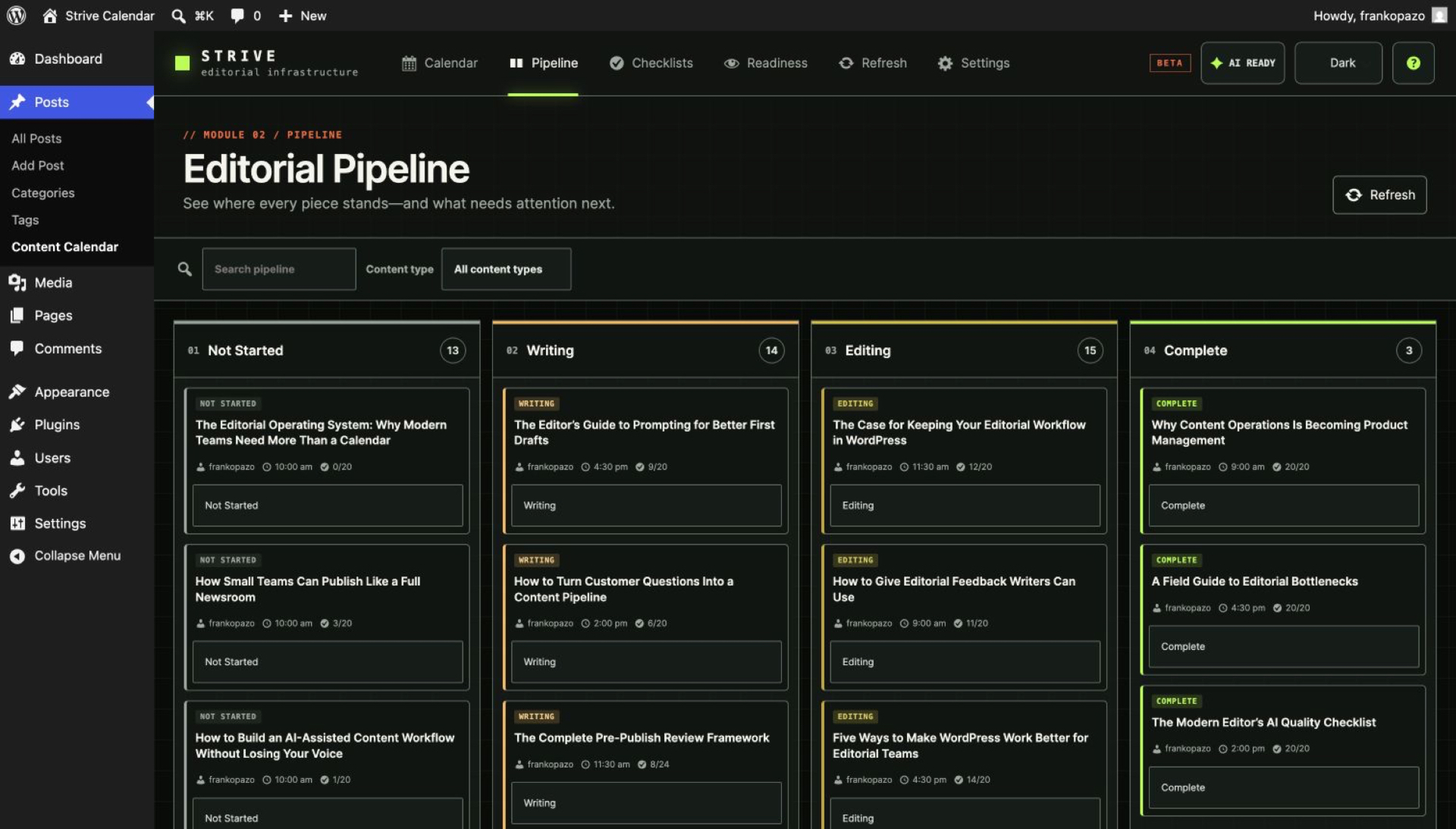
Pro: Maintenance layer
Keep every published article accurate
Pro is built for the articles you already shipped: update them safely, improve them with evidence, and keep them accurate.
Safe article revisions
Work privately on a published article while the live version stays untouched, then republish safely without changing its URL or history.
Enhanced Editorial Readiness
Ask the site's connected WordPress AI provider for deeper, evidence-linked editorial feedback beside the saved article.
Guided fixes with automatic re-evaluation
Review a before-and-after proposal, approve only the change you want, preserve a WordPress revision, and keep fixing without rerunning the full review.
Editorial briefs
Define audience, outcome, angle, keyword, evidence and acceptance criteria before writing, then use the brief to guide checklists and review.
Internal-link opportunities
Find relevant articles already on the site, review suggested anchors and insertion points, and apply a link only after approval.
Refresh Radar
See which published articles are due for attention, start a protected refresh revision and build content maintenance into the calendar.
AI policy: WordPress native
AI is optional, and it never acts alone
Strive uses the AI provider connected to WordPress. There is no Strive-hosted AI service and no credit meter.
- Strive remains useful without AI.
- Strive never asks you to paste provider API keys into the plugin.
- AI features use the native WordPress AI connection and require WordPress 7.0 or later plus a compatible configured provider.
- Article content is sent only when an authorised user explicitly runs an eligible AI action.
- Private editorial notes are excluded from AI prompts.
- AI output is a proposal, not an automatic publication decision.
- A failed AI request leaves content, status, schedule and publication state unchanged.
Compare Lite and Pro
What Lite includes, and what Pro adds
Pro replaces Lite on activation and preserves your existing editorial data.
| Capability | Strive Calendar Lite — Free | Strive Calendar Pro — From $9/month |
|---|---|---|
| Content Calendar | Included | Included |
| Unscheduled drafts | Included | Included |
| Pipeline Board and List | Included | Included |
| Four editorial statuses | Included | Included |
| Reusable checklists and per-article progress | Included | Included |
| Editorial notes | Included | Included |
| Local Editorial Readiness | Included | Included |
| Copyable external review brief | Included | Included |
| Solo and Team Workspace | Included | Included |
| Automatic, Light and Dark appearance | Included | Included |
| Safe revisions of published articles | Pro only | Included |
| Enhanced WordPress AI readiness | Pro only | Included with eligible WordPress AI connection |
| Guided fixes and automatic re-evaluation | Pro only | Included |
| Editorial briefs and brief-to-checklist | Pro only | Included |
| Internal-link opportunities and safe application | Pro only | Included |
| Refresh Radar | Pro only | Included |
| License or expiry | None | Paid Pro license required for Pro execution |
"Pro only" means Lite shows you where the capability lives, but running it requires an active Pro license. See full pricing.
Customer story

“Strive puts all my writing plans and stages into the WordPress editor where I can see what I have to do before publishing a post. It's amazing how easy content managing is with Strive.”
Field notes: Recent entries
From the editorial blog

WordPress Editorial Calendar Examples: 5 Layouts That Actually Work
Five practical WordPress editorial calendar layouts — solo blogger, two-person team, multi-author, full pipeline, and evergreen refresh — with the workflow behind each.
WordPress-Native AI: Why Human Governance is Essential
AI needs an central editorial hub to ensure brand alignment. Discover why human governance within WordPress is essential to protect your editorial integrity.
Why Draft and Published Are Failing Your Content Team
Basic WordPress permissions don't solve workflow issues. Discover how custom statuses provide operational clarity and keep your publishing pipeline moving.
Enforcing Editorial Standards Without Micromanaging
Ensure consistent editorial readiness across your site. Learn how to use native checklists to maintain quality without micromanaging your writing team.
Building Strive V2: Prioritising People Who Actually Ship
We are building Strive V2 to provide reliable editorial infrastructure for professional teams. Discover how we are prioritising structured workflows and human-governed AI over mindless automation.
The Operational Reality of Managing Evergreen Content
Refreshing content safely without breaking the live version requires proper editorial infrastructure. Learn how to plan, review, and ship updates securely without risking your live WordPress site.
How to Safely Update High-Traffic WordPress Posts
Editing live articles can jeopardise your site. Learn how to use proper editorial infrastructure to update high-traffic posts safely without breaking layouts or losing SEO rankings.
The Anatomy of a Trustworthy Editorial Process
Trust is built through rigorous verification checks, not just good intentions. Learn how to standardise your publishing workflow, eliminate ad-hoc reviews, and ship with absolute confidence.
Get started with Lite
Plan next week, then fix last year.
Install Lite free, and add Pro when maintaining the library becomes the job.
Free forever. No license, no account, no expiry.